

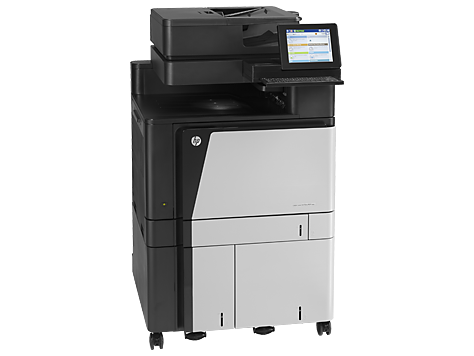
HP Color LaserJet Enterprise flow MFP M880z+ NFC/Wireless Direct D7P71A#BGJ
Enterprise Flow with NFC/Wireless Direct
High-volume Laser Multifunction Printers
Overview
- A3 (11.7 in x 16.5 in)
- Ledger (11 in x 17 in) (original)
- A3/Ledger (media)
- up to 45 ppm (copying)
- up to 45 ppm (printing)
- 4100 sheets
- 33.6 Kbps
- Gigabit LAN
- Wi-Fi(n)
- USB 2.0
- USB host (internal)
- NFC
- USB 2.0 host
This top-of-the-line enterprise MFP helps streamline workflows and accelerate document tasks—with advanced finishing options and file sharing. Give users simple, direct access to this MFP through mobile printing and touch-to-print capabilities.7
Print speed (letter):10 Up to 45 ppm (black); Up to 45 ppm (color)
Print resolution: Black (best): Up to 1200 x 1200 dpi; Color (best): Up to 1200 x 1200 dpi
Scan resolution: Up to 600 x 600 dpi hardware, Up to 600 dpi Optical
Standard connectivity: 2 Hi-Speed USB 2.0 Host; 1 Hi-Speed USB 2.0 Device; 1 Gigabit Ethernet 10/100/1000T
Network; 1 Foreign Interface; 1 Hardware Integration Pocket (HIP); 2 Internal USB Host; 1 Fax
Duty cycle:11 Up to 200,000 pages
Duplex print options: Automatic (standard)
Mobile printing capability:12 HP ePrint; Apple AirPrint™; Mobile Apps; HP Wireless Direct printing (optional)
Give workgroups the speed they need
- Let departments scan without worry. HP EveryPage detects potential errors or missed pages on the spot.
- Manage content in a way you never thought possible with HP Flow CM Enterprise.3
- Forget email. Let employees scan and send documents to Microsoft® SharePoint® in one step.
- Make it easy to be efficient with an intuitive touchscreen and large pull-out keyboard.
Keep business moving
- Save on both sides—capture documents faster with two-sided, single-pass scanning.
- Create easily searchable scanned files, using built-in optical character recognition software.
- Save IT time and make printing easy for the entire company by using a single driver for all HP devices.4
- Let employees bind big jobs faster using the built-in finishing options.6
Mobile printing—more efficient
- Mobile printing at a touch—enable touch-to-print convenience from mobile devices.1
- Simplify printing. Give users simple, direct access to the MFP through wireless direct printing.2
- Let employees print from mobile devices with built-in print capability or HP ePrint app and software.7
- Give users the power to print wirelessly from an iPad®, iPhone®, or iPod touch®.5
Invest once, expand easily, and manage efficiently
- Expand your options. Easily upgrade firmware on your schedule. Easily integrate solutions or devices at will.
- Help build business efficiency. Centrally monitor and control printers with HP Web Jetadmin.8
- Apply fleet-wide policies to help protect your HP devices with HP Imaging and Printing Security Center.9
- Confidently safeguard the sensitive data sent to your MFP with the HP High-Performance Secure Hard Disk.
Top features
Streamline and accelerate workflows across your business with a top-of- the-line enterprise MFP.
- Accelerate business workflows and easily connect users throughout your office. Share documents without delay, using flexible send-to options. Complete big jobs fast, thanks to versatile paper- handling tools.
- Boost productivity and avoid delays. Employees can scan two-sided documents in one pass and add professional finishing touches with minimal effort.
- Eliminate the wires and complications from mobile printing. Enable easy printing from smartphones, tablets, and laptops at work, home, or on the go. Give users simple access through wireless direct printing and touch-to-print technology.1, 2, 3
- Help protect your printer investment and manage printing across the enterprise. Easily upgrade and add capabilities as your needs change. Manage the printing fleet from a single location. Expect high efficiency for the long term.
Product Walkthrough
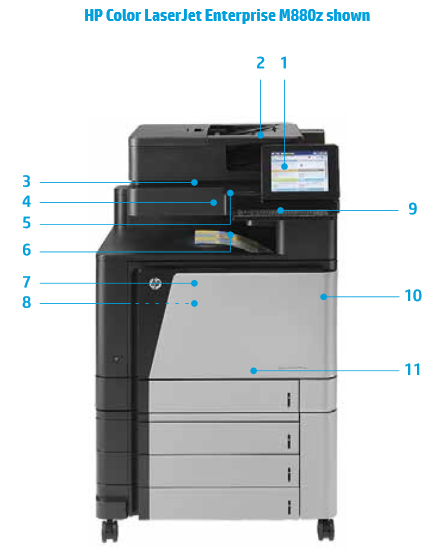
- Intuitive 20.3 cm (8-inch) HP Easy Select pivoting color touchscreen control panel
- 200-sheet automatic document feeder
- Plate glass color scanner handles sizes up to 11 x 17 in/A3
- Easy-access USB port to save and print files directly
- Hardware integration pocket for solution integration
- 500-sheet output bin
- Front door provides convenient access to HP toner cartridges and drums
- Built-in automatic two-sided printing
- Keyboard for easy, accurate data entry
- 100-sheet multipurpose tray 1 handles heavy custom media up to 58 lb bond (220 g/m2)
- 500-sheet input tray supports media up to size 11 x 17 in/A3
Specifications
| HP Color LaserJet Enterprise flow M880z MFP | |
|---|---|
| AIO functions | Print, copy, scan, fax; AiO multitasking supported: Yes |
| Duplex print options | Automatic (standard) |
| Print speed1 | Black (normal, letter): Up to 45 ppm; Color (normal, letter): Up to 45 ppm; |
| First page out2 | Black (letter, ready): As fast as 11 sec; Color (letter, ready): As fast as 11 sec |
| Print technology | Laser |
| Print resolution | Black (best): Up to 1200 x 1200 dpi; Black (normal): Up to 1200 x 1200 dpi; Color (best): Up to 1200 x 1200 dpi |
| Print resolution technologies | HP ImageREt 4800; HP FastRes 1200 (1200 dpi quality), 600 x 600 dpi; HP ProRes 1200 (1200 x 1200 dpi); Pantone© Calibrated |
| Print cartridges number | 4 (1 each Cyan, Magenta, Yellow, Black) |
| Printer smart software features | HP ePrint, Apple AirPrint™, Open Extensibility Platform, FutureSmart Firmware, Instant-on Technology, HP Auto-On/Auto-Off Technology, HP Easy Color, Pantone© Calibrated, print preview, duplex, print multiple pages per sheet (2, 4, 6, 9, 16), collation, watermarks, store print jobs, job separator, staple, offset, booklet making, hole punch |
| Mobile printing capability3 | HP ePrint; Apple AirPrint™; Mobile Apps; HP Wireless Direct printing (optional) |
| Standard print languages | HP PCL 6, HP PCL 5, HP postscript level 3 emulation, PDF |
| Printer management | HP Web Jetadmin; HP Utility (Mac) |
| Scan type | Flatbed, ADF |
| Scan speed4 | Letter: Up to 70 ppm (b&w), Up to 68 ppm (color) |
| Scan resolution | Hardware: Up to 600 x 600 dpi; Optical: Up to 600 dpi |
| Scan technology | Contact Image Sensor (CIS) |
| Scan file format | Digital Send: PDF, JPEG, TIFF, MTIFF, XPS, PDF/A, TEXT (OCR), Unicode TEXT (OCR), RTF (OCR), Searchable PDF (OCR), Searchable PDF/A (OCR), HTML (OCR), CSV (OCR); Scan to easy access USB: PDF, JPEG, TIFF, MTIFF, XPS, PDF/A, TEXT (OCR), Unicode TEXT (OCR), RTF (OCR), Searchable PDF (OCR), Searchable PDF/A (OCR), HTML (OCR), CSV (OCR); Print from easy access USB: PDF, PS, Print Ready files (.prn, .pcl, .cht) |
| Scan input modes | Copy, scan-to-email, scan to network folder, scan to USB, save to device |
| Scan size maximum | 297 x 432 mm (11.7 x 17 in) |
| Scanner advanced features | Optimize text/picture, Image adjustments, Job build; Output quality setting, Selectable scan resolution 75 to 600 dpi; Auto detect color, Edge erase, Auto tone, Auto job notification, Blank page suppression, Auto orientation, Auto page crop, HP Quick Sets |
| Bit depth/Grayscale levels | 24 bit/256 |
| Copy speed5 | Up to 45 ppm (black, letter); Up to 46 ppm (black, A4) |
| Copy resolution | Black (text and graphics): Up to 600 x 600 dpi; Color (text and graphics): Up to 600 x 600 dpi |
| Max number of copies | Up to 9,999 copies |
| Copier resize | 25 to 400% |
| Copier settings | Sides; Collate; Paper Selection; Color/Black; Reduce/Enlarge; Image Adjustment; Content Orientation |
| Fax speed | 13 sec per page |
| Fax resolution | Black (best): Up to 300 x 300 dpi; Black (standard): 100 x 100 dpi; Black and White (fine): 200 x 200 dpi, 256 levels of gray; Black Photo Grayscale: 300 x 300 dpi, 256 levels of gray |
| Fax smart software features | Stored faxes; fax archiving; fax forwarding; scale-to-fit; fax address book; LAN/Internet fax; fax number confirmation; Holiday fax schedule |
| Fax memory | Incoming fax can be stored to disk |
| Fax features | Auto fax reduction supported: Yes; Auto-redialing: Yes; Fax delayed sending: No; Distinctive ring detection supported: Yes; Fax forwarding supported: Yes; Fax phone TAM interface supported: No; Fax polling supported: No; Junk barrier supported: Yes, as blocked fax numbers; PC interface supported: Yes, PC fax send only; Telephone handset supported: No; Fax telephone mode supported: No |
| Standard connectivity | 2 Hi-Speed USB 2.0 Host; 1 Hi-Speed USB 2.0 Device; 1 Gigabit Ethernet 10/100/1000T Network; 1 Foreign Interface; 1 Hardware Integration Pocket (HIP); 2 Internal USB Host; 1 Fax |
| Memory | 2.5 GB |
| Processor speed | 800 MHz |
| Duty cycle (monthly, A4)6 | Up to 200,000 pages |
| Recommended monthly page volume7 | 5,000 to 25,000 pages |
| Paper handling | 100-sheet multipurpose tray, 4 x 500-sheet input tray; 500-sheet face-down bin |
| Media type | Cut sheet paper, labels, transparencies, glossy paper, glossy film, photo media, tough paper, envelopes |
| Media weight | 60 to 220 g/m² (16 to 58 lb) |
| Supported media sizes | Tray 1: A3, A4, A4-R, A5, B5 (JIS), B4 (JIS), RA4, SRA4, 8K (270 x 390), 8K (260 x 368), 8K (273 x 394), 16K (195 x 270), 16K (184 x 260), 16K (197 x 273); RA3, SRA3, A6, B6 (JIS), Photo 2L, DPostcard (JIS); Envelopes: B5, C5, C6, DL; Tray 2: A3, A4, A4-R, A5, B5 (JIS), B4 (JIS), RA4, SRA4, 8K (270 x 390), 8K (260 x 368), 8K (273 x 394), 16K (195 x 270), 16K (184 x 260), 16K (197 x 273); Trays 3+: A3, A4, A4-R, A5, B5 (JIS), B4 (JIS), 8.5 x 13, RA4, SRA4, 8K (270 x 390), 8K (260 x 368), 8K (273 x 394), 16K (195 x 270), 16K (184 x 260), 16K (197 x 273); RA3, SRA3 |
| Auto document feeder capacity | Standard, 200 sheets (20 lb, 75 g/m²) |
| Dimensions (W x D x H) | 704 x 635 x 1199 mm (27.7 x 25 x 47.2 in); Maximum: 1000 x 800 x 1199 mm (39.4 x 31.5 x 47.2 in) |
| Weight | 150.6 kg (332 lb) |
| What's in the box | HP Color LaserJet Multifunction Printer; Black, Cyan, Magenta, and Yellow HP Color LaserJet Drums; Black, Cyan, Magenta, and Yellow HP Color LaserJet Toner Cartridges; CD with software drivers and documentation; Documentation (Hardware Install Guide); power cord; HP Jetdirect Gigabit Ethernet Print Server (embedded); 100-sheet multipurpose tray 1; 500-sheet input tray 2; Automatic duplexer (built-in); Encrypted Hard Drive: 3 x 500-sheet paper input; Fax; Fax cable |
| Warranty features | One-year, next-business day, onsite warranty |
| Compatible operating systems | Windows 8 (32-bit/64-bit), Windows 7 (32-bit/64-bit), Windows Vista (32-bit/64-bit), Windows XP (SP2 or higher) (32-bit/64-bit), Windows Server 2012 (64-bit), Windows Server 2008 (32-bit/64-bit), Windows Server 2008 R2 (64-bit), Windows Server 2003 (SP1 or higher) (32-bit/64-bit), Mac OS X version 10.6.8, 10.7.5 Lion, 10.8 Mountain Lion. For the latest operating system support see: Air Print (support.apple.com/kb/ht4356); Android (android.com/); Citrix and Windows Terminal Services (hp.com/go/upd); HP ePrint Software Driver (hp.com/go/eprintsoftware); Linux (hplip.net); Novell (novell.com/iprint); SAP device types (hp.com/go/sap/drivers); SAP Print (hp.com/go/sap/print); UNIX (hp.com/go/unix); UNIX JetDirect (hp.com/go/jetdirectunix_software) |
| Minimum system requirements | PC: Windows 8, Windows 7 (SP1 or higher), Windows Vista, Windows XP (SP2 or higher), Windows Server 2012 (64-bit), Windows Server 2008; Windows Server 2003 (SP1 or higher), Windows Server 2008 R2 (64-bit); 200 MB available hard disk space; CD-ROM or DVD drive, or Internet connection; Dedicated universal serial bus (USB 1.1 or 2.0), or network connection (Operating system compatible hardware system requirements see microsoft.com); Mac: Mac OS X v10.6.8, OS X 10.7.5 Lion, OS X 10.8 Mountain Lion; 1 GB of available hard-disk space; CD-ROM or DVD drive, or Internet connection; Dedicated universal serial bus (USB 1.1 or 2.0), or network connection (Operating system compatible hardware system requirements see apple.com) |
| Fonts and typefaces | 105 internal TrueType fonts scalable in HP PCL; 92 internal scalable fonts in HP Postscript Level 3 emulation (Euro symbol built-in); 1 internal Unicode Fonts (Andale Mono WorldType); 2 Internal Windows Vista 8 Fonts (Calibri, Cambria); additional font solutions available via third-party flash memory cards; HP LaserJet Fonts and IPDS Emulation available at hp.com/go/laserjetfonts |
| Control panel | 20.3 cm (8.0-in) color LCD with Capacitive touchscreen; rotating (adjustable angle) display; illuminated Capacitive Home button (for quick return to the Home menu); Easy Access USB; Hardware Integration Pocket |
| Display | 20.3 cm (8.0-in) SVGA 800 x 600 dpi resolution capacitive-touch display with gesture support and extended keyboard |
| Power8 | Power supply type: Built-in power supply Power supply required: 110-volt input voltage: 110 to 127 VAC (+/- 10%), 60 Hz (+/- 2 Hz), 10.5 A; 220-volt input voltage: 220 to 240 VAC (+/- 10%), 50 Hz (+/- 2 Hz), 5.5 A (Not dual voltage, power supply varies by part number with # Option code identifier) Power consumption: 1100 watts (Printing), 1100 watts (Copying), 80 watts (Ready), 8.0 watts (Sleep), 1.2 watt (Auto-Off), 0.4 watts (Off) |
| Software included | HP PCL 6 Discrete Printer Driver; Mac SW Link to Web (Mac Installer); Windows Installer |
| Acoustic9 | Acoustic power emissions: 7.0 B(A); Acoustic power emissions (active, copy): 7.2 B(A); Acoustic power emissions (active, scan): 7.0 B(A); Acoustic power emissions (ready): 5.0 B(A); Acoustic pressure emissions bystander (active, copy): 55 dB(A); Acoustic pressure emissions bystander (active, scan): 54 dB(A); Acoustic pressure emissions bystander (active, printing): 54 dB(A); Acoustic pressure emissions bystander (ready): 33 dB(A) |
| Operating environment | Operating humidity range: 10 to 80% RH; Non-operating humidity range: 10 to 90% RH; Recommended operating humidity range: 10 to 80% RH; Operating temperature range: 59 to 86° F (15 to 30° C); Recommended operating temperature range: 59 to 86° F (15 to 30° C); Storage temperature range: 32 to 95° F (0 to 35° C) |
| Security management | Identity management: Kerberos authentication, LDAP authentication, 1000 user PIN codes, optional HP and 3rd party advanced authentication solutions (e.g., badge readers); Network: IPsec/firewall with Certificate, Pre-Shared Key, and Kerberos authentication, Supports WJA-10 IPsec configuration Plug-in, 802.1X authentication (EAP-PEAP, EAP-TLS), SNMPv3, HTTPS, Certificates, Access Control List; Data: Storage Encryption, Encrypted PDF & Email (uses FIPS 140 validated cryptographic libraries from Microsoft), Secure Erase, SSL/TLS (HTTPS), Encrypted Credentials; Device: Security lock slot, USB port disablement, hardware integration pocket for security solutions; Security management: Compatible with HP Imaging and Printing Security Center |